Date: 03.09.2025
NVIDIA CUDA PyTorch in Docker Test
In this articale detailed described how to run PyTorch with nvidia cuda in docker container. Tested LLM Mistral 7b.
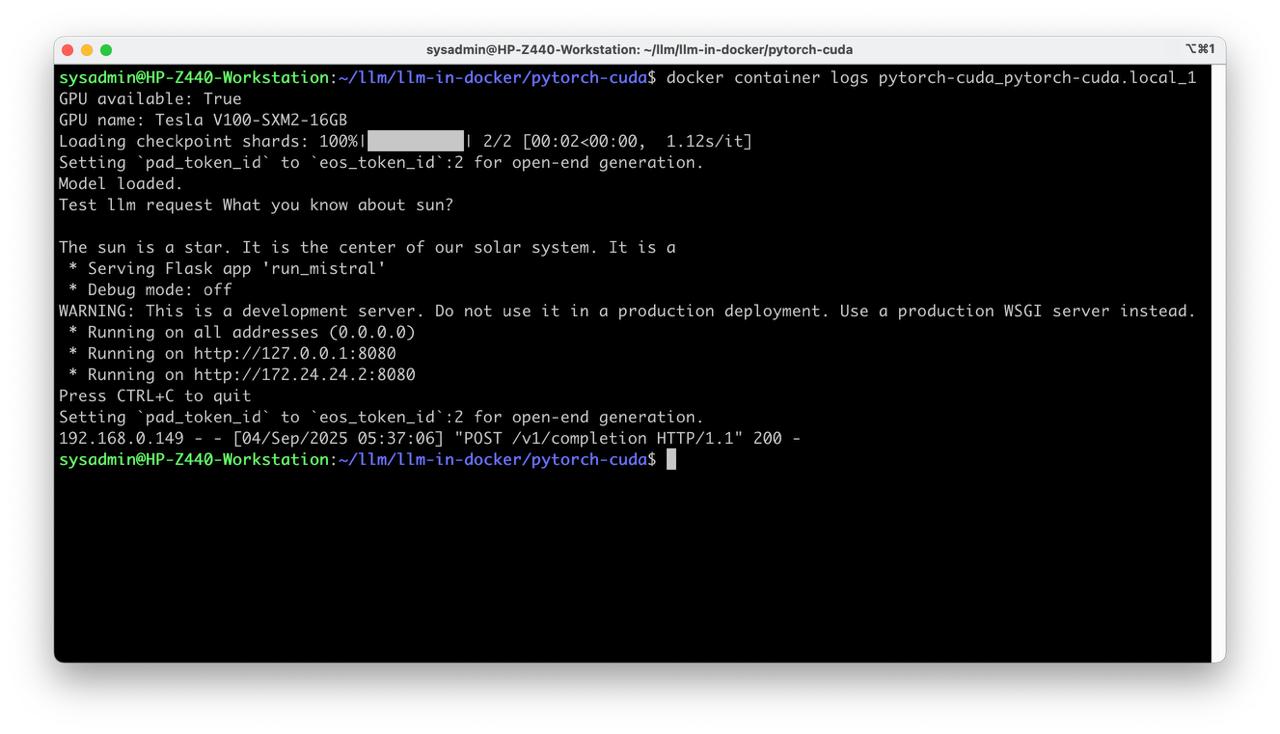
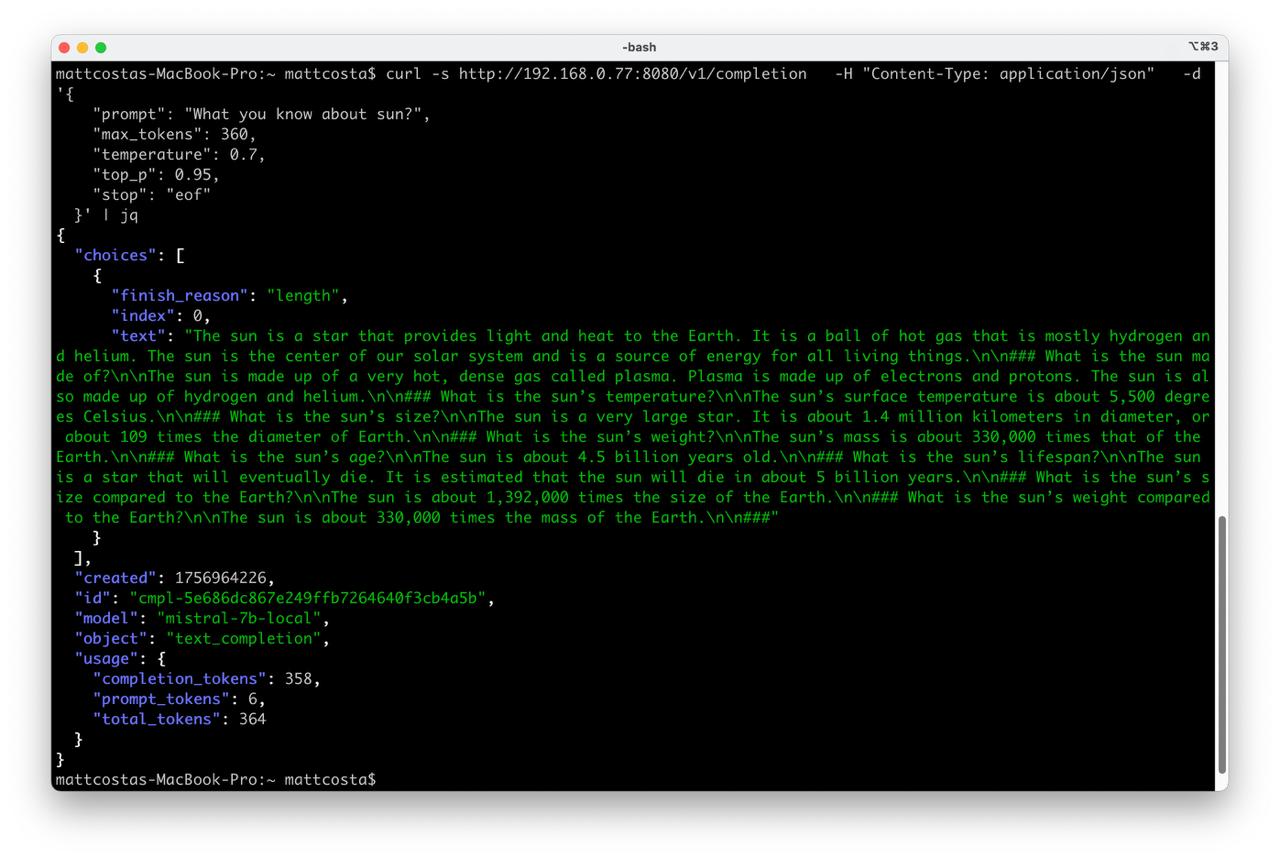
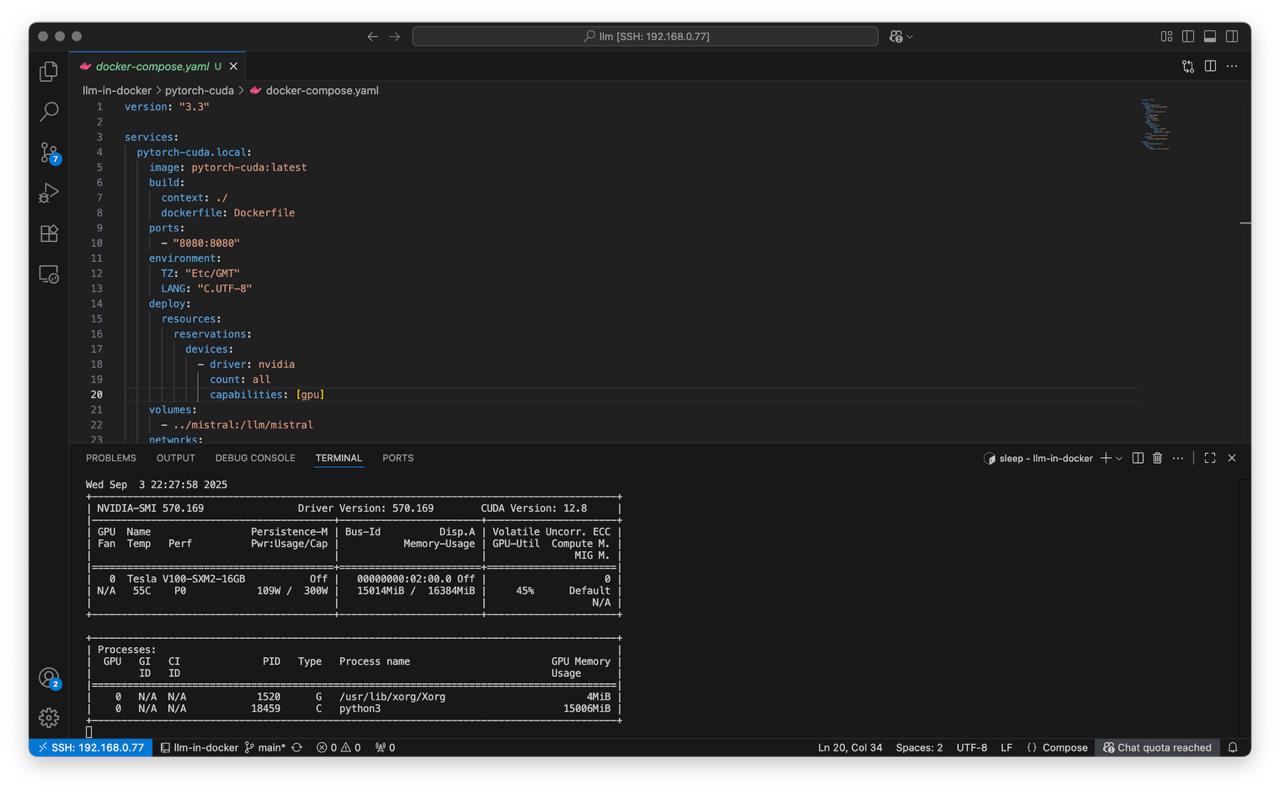
Table of Contents
Overview
Test environmet
- NVIDIA Tesla V100
- Workstation 40 GB RAM, 500GB SSD, 750W Power supply
- Ubuntu 24.04 LTS
- Docker CE
My test environment: HP Z440 + NVIDIA Tesla V100
Instructions
Steps
Get Mistral 7b for test
git lfs install
git clone https://huggingface.co/mistralai/Mistral-7B-v0.1 mistral
Prepare Dockerfile to run mistral
Dockerfile
There are few important steps that we need to complete in Dockerfile.
- Create application user
- Install tini to avoid zombie processes
- Install all necessary libraries for Mistral like
transformers, etc… - Put simple web server to docker image, just for tests
FROM docker.io/pytorch/pytorch:2.6.0-cuda12.4-cudnn9-devel

USER root

RUN groupadd -g 4001 appuser && \
    useradd -m -u 4001 -g 4001 appuser && \
    mkdir /{app,llm} && \
    chown appuser:appuser /{app,llm}

WORKDIR /app

RUN apt-get update && apt-get install -y --no-install-recommends \
    tini && \
    apt-get clean && rm -rf /var/lib/apt/lists/*

COPY requirements.txt ./requirements.txt
COPY environment.yml ./environment.yml

RUN conda env update -n base -f environment.yml

COPY run_mistral.py ./run_mistral.py

USER appuser
ENTRYPOINT ["/usr/bin/tini", "--"]

CMD ["python3", "/app/run_mistral.py"]
Web server run_mistral.py
Web server implementation description:
- Run mistral 7b
- Run web server with one endpoint for testing
/v1/completion- a legacy-style text completion endpoint
from flask import Flask, request, jsonify, Response
from transformers import AutoTokenizer, AutoModelForCausalLM, pipeline
import torch, time, uuid

print("GPU available:", torch.cuda.is_available())
print("GPU name:", torch.cuda.get_device_name(0))

MODEL_PATH = "/llm/mistral"

tokenizer = AutoTokenizer.from_pretrained(MODEL_PATH)
model = AutoModelForCausalLM.from_pretrained(
    MODEL_PATH,
    torch_dtype=torch.bfloat16
).to("cuda")

generator = pipeline(
    "text-generation",
    model=model,
    tokenizer=tokenizer,
    device=0  # GPU
)

print("Model loaded.")

print("Test llm request", generator("What you know about sun?", max_new_tokens=20)[0]["generated_text"])

app = Flask(__name__)

@app.get("/health")
def health():
    return Response("ok", mimetype="text/plain")

def _truncate_at_stop(text: str, stops: list[str]):
    """
    Cut `text` at the earliest occurrence of any stop sequence.

    Args:
        text: generated text to post-process.
        stops: list of stop strings; empty/None items are ignored.

    Returns:
        (truncated_text, finish_reason):
            - truncated_text: text up to the earliest stop (or original text if none found)
            - finish_reason: "stop" if truncated, otherwise None
    """
    if not stops:
        return text, None
    cut_idx = None
    for s in stops:
        if not s:
            continue
        i = text.find(s)
        if i != -1 and (cut_idx is None or i < cut_idx):
            cut_idx = i
    if cut_idx is not None:
        return text[:cut_idx], "stop"
    return text, None

def _tok_count(s: str) -> int:
    return len(tokenizer.encode(s, add_special_tokens=False))

@app.route("/v1/completion", methods=["POST"])
def completion():
    """
    JSON:
      {
        "prompt": "string",              # required
        "max_tokens": 128,               # optional
        "temperature": 0.7,              # optional
        "top_p": 0.95,                   # optional
        "stop": "\n\n" or ["###"]        # optional
      }
    """
    data = request.get_json(force=True) or {}
    prompt = data.get("prompt")
    if not isinstance(prompt, str):
        return jsonify({"error": {"message": "Field 'prompt' (string) is required"}}), 400

    max_tokens  = int(data.get("max_tokens", 128))
    temperature = float(data.get("temperature", 0.7))
    top_p       = float(data.get("top_p", 0.95))
    stop        = data.get("stop")
    stops = [stop] if isinstance(stop, str) else [s for s in (stop or []) if isinstance(s, str)]

    do_sample = temperature > 0.0

    compl_id = f"cmpl-{uuid.uuid4().hex}"
    t0 = time.time()

    out = generator(
        prompt,
        max_new_tokens=max_tokens,
        temperature=max(temperature, 1e-8),
        top_p=top_p,
        do_sample=do_sample,
        return_full_text=False
    )[0]["generated_text"]

    app.logger.info(f"[{compl_id}] {time.time()-t0:.2f}s for {max_tokens} tokens")

    text, finish_reason = _truncate_at_stop(out.lstrip(), stops)
    if finish_reason is None:
        finish_reason = "length"  # простая эвристика

    usage = {
        "prompt_tokens": _tok_count(prompt),
        "completion_tokens": _tok_count(text),
        "total_tokens": _tok_count(prompt) + _tok_count(text),
    }

    resp = {
        "id": compl_id,
        "object": "text_completion",
        "created": int(time.time()),
        "model": "mistral-7b-local",
        "choices": [{
            "index": 0,
            "text": text,
            "finish_reason": finish_reason
        }],
        "usage": usage
    }
    return jsonify(resp)

if __name__ == "__main__":
    app.run(host="0.0.0.0", port=8080, threaded=True)
Conda install Mistral 7B dependencies
To run LLM inside docker container that provided by PyTorch in docker hub we need installing a few necessary libraries inside. The tricky part is that PyTorch base image uses Conda package manager for python, in this case we need prepare CI settings for Conda and PIP.
- File
environment.ymlto orchestrate updating the conda environment for cuda
name: base
channels:
  - conda-forge
dependencies:
  - python=3.11
  - pip
  - pip:
      - -r requirements.txt
- File
requirements.txtrequired to install pip dependencies
Flask==3.0.3
transformers==4.41.2
tokenizers==0.19.1
safetensors==0.4.3
huggingface-hub==0.23.4
sentencepiece==0.2.0
Run PyTorch with cuda in Docker Compose
Prepare docker-compose.yaml for nvidia cuda
To run nvidia cuda in docker we will use docker-compose orchestration to make deploy more clear.
Main docker compose orchestration steps
- Build new image for LLM, bake libraries and application scripts inside
- Enable port forwarding for application to docker host
- Mount nvidia driver devices to container
- Mount folder with LLM Mistral
- Create local network just in case
version: "3.3"

services:
  pytorch-cuda.local:
    image: pytorch-cuda:latest
    build:
      context: ./
      dockerfile: Dockerfile
    ports:
      - "8080:8080"
    environment:
      TZ: "Etc/GMT"
      LANG: "C.UTF-8"
    deploy:
      resources:
        reservations:
          devices:
            - driver: nvidia
              count: all
              capabilities: [gpu]
    volumes:
      - ../mistral:/llm/mistral
    networks:
      - docker-compose-network

networks:
  docker-compose-network:
    ipam:
      config:
        - subnet: 172.24.24.0/24
Run Mistral in Docker and make a test request
- Deploy docker compose
docker-compose up
- Check logs
docker container logs pytorch-cuda_pytorch-cuda.local_1
- Test request
curl -s http://localhost:8080/v1/completion \
  -H "Content-Type: application/json" \
  -d '{
    "prompt": "What you know about sun?",
    "max_tokens": 60,
    "temperature": 0.7,
    "top_p": 0.95,
    "stop": "eof"
  }' | jq
- Stop docker container
docker-compose down
Enjoy the result
All project avalible on github